
54 lines
1.9 KiB
Markdown
54 lines
1.9 KiB
Markdown
---
|
||
title: Deepin/UOS文件管理器隐藏不需要的盘符
|
||
date: 2022-02-23T09:18:55+08:00
|
||
lastmod: 2022-02-23T09:18:55+08:00
|
||
draft: false
|
||
description: "处理UOS出现其他盘符的问题"
|
||
authors:
|
||
- Kushidou
|
||
tags:
|
||
- Linux
|
||
- Deepin/UOS
|
||
categories: []
|
||
toc: true
|
||
comments: true
|
||
---
|
||
|
||
Deepin/UOS 里处理文件管理器显示太多盘符的问题。
|
||
|
||
<!--more-->
|
||
|
||
## 现象
|
||
|
||
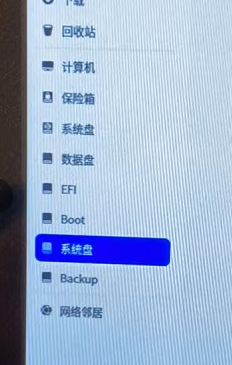
在使用UOS操作系统时,有时候打开文件管理器,发现除了平常常见的“系统盘”、“数据盘”外,出现了更多的盘符(不属于移动u盘)。在`/etc/fstab`文件添加或删除“”并没有效果。
|
||
|
||
|
||
|
||
## 原理/原因
|
||
|
||
这是因为系统/etc/udev/rules.d文件夹做了非法修改。有些人盲目替换了文件夹文件,导致配置文件变化,系统无法正确执行隐藏操作。
|
||
|
||
## 处理方法
|
||
|
||
1. 打开`/etc/udev/rules.d`目录,查看是否有一个《80-udisks2.rules》文件。如果该文件不存在,请创建。
|
||
|
||
2. 打开终端,使用root权限打开编辑
|
||
|
||
```bash
|
||
sudo deepin-editor /etc/udev/rules.d/80-udisk2.rules
|
||
```
|
||
|
||
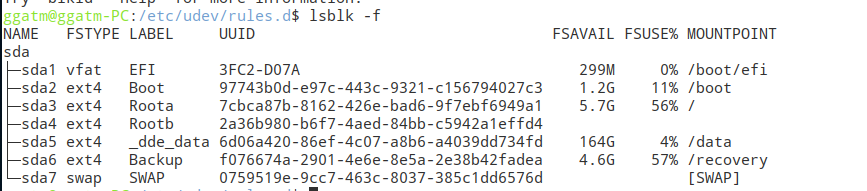
3. **打开新的终端**,输入执行 `blkid -f` ,记录LABLE、UUID两列
|
||
|
||
|
||
|
||
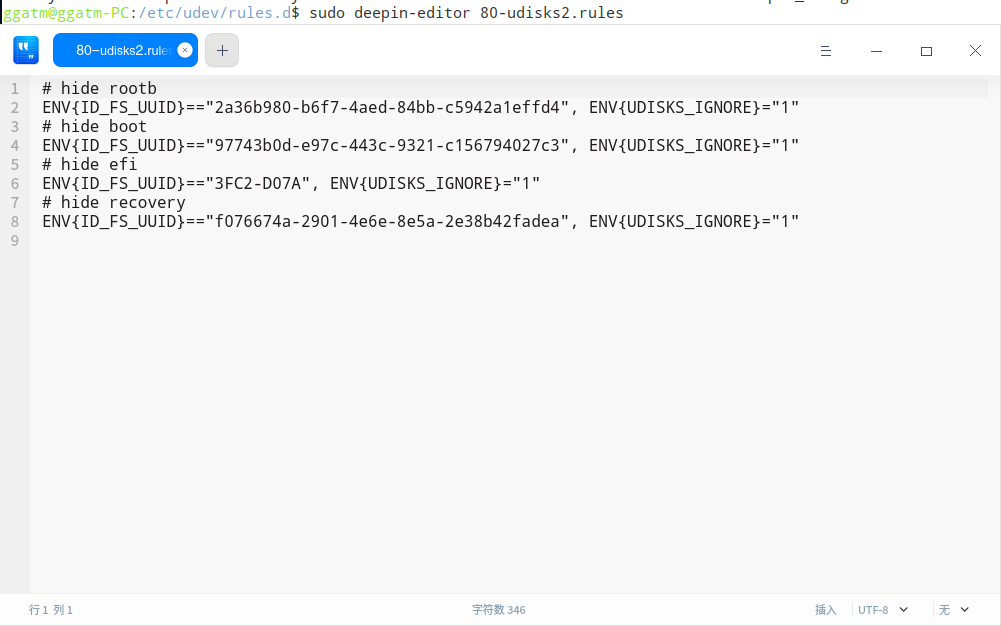
4. 对比`80-udisks2.rules`的内容,将里面的ENV{ID_FS_UUID}后面引号中内容换成第3步中显示的新的UUID。
|
||
|
||
(#号后面内容即为盘符,对应3中的LABEL,双等号后面就是UUID,四行都需要替换)
|
||
|
||
|
||
|
||
5. 保存文件并重启计算机,即可看到效果。
|
||
|
||
6. 该方法对Deepin系统也有效。对于其他使用了dde-file-manager的应该也是有作用的。
|